Skip to content
Clinchmark

Head to head

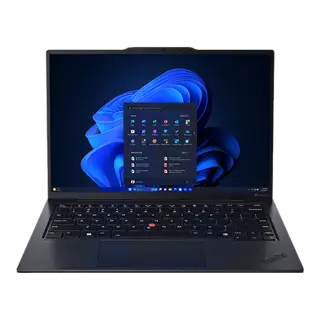
Lenovo ThinkPad X1 Carbon Gen 12 vs Lenovo Yoga Pro 9i 16

Lenovo Yoga Pro 9i 16 leads 5 to 3 on the 8 rankable specs and costs $50 less, which makes it the straightforward pick.

Catalog as of September 1, 2026

Why, in numbers

Manufacturer list price, not a live offer. Confirm current pricing before you buy.

Swap
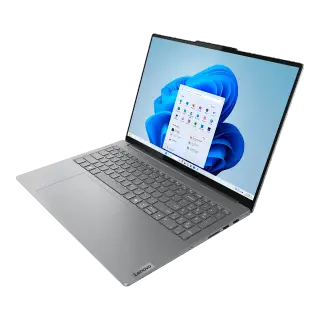
Lenovo Yoga Pro 9i 16
$1,7995 spec wins
Swap

Generational Upgrade Analysis

Generational Comparison

Lenovo sibling models compared across generations.

Our recommendation: Compare the spec differences below to see if the price premium justifies the newer model's additions.

Buying for

Every rankable spec counts once. Pick a lens to score only what matters for your laptop.

Your devices

Select your ecosystem to flag non-functional features or platform lock-in.

Straight answer

Overall: 3 to 5

Buy the Lenovo Yoga Pro 9i 16.

  • Leads 5 of 8 rankable overall specs; Lenovo ThinkPad X1 Carbon Gen 12 takes 3.
  • Size: 16.0 inches vs 14.0 inches
  • Resolution: 3200 × 2000 vs 2880 × 1800
  • It is also $50 cheaper.

Check first: the Lenovo Yoga Pro 9i 16 weighs over 4 lb (1.8 kg). Tick them under deal-breakers if that rules it out.

3 Lenovo ThinkPad X1 Carbon Gen 128 rankable of 29 specsLenovo Yoga Pro 9i 16 5

Deal-breakers

tick what would make you walk away

  • row

    No pen or touch input for marking up PDFs or sketching.

    Trips:Lenovo ThinkPad X1 Carbon Gen 12 · No (non-touch standard)Clear:Lenovo Yoga Pro 9i 16 · Yes
  • row

    The memory you buy today is the memory you keep.

    Trips:Lenovo ThinkPad X1 Carbon Gen 12 · No (soldered)Trips:Lenovo Yoga Pro 9i 16 · No (soldered)
  • row

    Heavy in a backpack on a daily commute.

    Clear:Lenovo ThinkPad X1 Carbon Gen 12 · 2.42 lbTrips:Lenovo Yoga Pro 9i 16 · 4.9 lb

At a glance

The handful of numbers that decide most purchases in this category.

3 of 4 differ

Panel

ThinkPad X1 Carbon Gen 12

OLED 2.8K Anti-glare

Yoga Pro 9i 16

3.2K PureSight Pro Mini-LED Touch

Processor

ThinkPad X1 Carbon Gen 12

Intel Core Ultra 7 155H

Yoga Pro 9i 16

Intel Core Ultra 9 185H

Memorysame

ThinkPad X1 Carbon Gen 12

32GB LPDDR5x

Yoga Pro 9i 16

32GB LPDDR5x

Claimed battery life

ThinkPad X1 Carbon Gen 12

~11–13 hours mixed use

Yoga Pro 9i 16

~6–8 hours mixed use

Commuter Portability & Lap Comfort Check

Real-world travel weight including chargers, bag fit, and lap thermals.

Ergonomic & Spatial Check

Backpack Sleeve Compatibility

ThinkPad X1 Carbon Gen 12

Fits standard 13"–14" slim backpack sleeves

Yoga Pro 9i 16

Standard laptop bag sleeve

Lap Ergonomics & Vent Placement

Bottom intake vents can choke and heat up your lap when used on beds or couches.

ThinkPad X1 Carbon Gen 12

Dual fans exhaust to side/rear; stays cool on lap during typing

Yoga Pro 9i 16

Standard hinge exhaust

Total Travel Weight (Chassis + Charger)

Always factor in the power adapter when calculating commuter bag weight.

ThinkPad X1 Carbon Gen 12

2.42 lb laptop + compact 65W GaN adapter = ~3.0 lb total carry

Yoga Pro 9i 16

Standard carry weight

The 90-Day Owner Regret Check

Documented ergonomic quirks, hardware annoyances, and maintenance realities reported by real owners.

Post-Purchase Truths

ThinkPad X1 Carbon Gen 12: What to watch for

  • Hardware Quirk

    Black soft-touch rubberized coating shows hand grease within minutes.

    The signature matte carbon lid and palm rest attract palm grease smudges that require frequent alcohol wipes to look clean.

Yoga Pro 9i 16: What to watch for

  • Maintenance

    Requires ongoing care to maintain peak out-of-box performance.

    Regular cleaning, firmware updates, and standard care are recommended to preserve longevity.

Display

leads 5-0
Display specifications. Middle column is Lenovo ThinkPad X1 Carbon Gen 12, right column is Lenovo Yoga Pro 9i 16.
Size14.0 inches16.0 inches (wins this row: higher)
PanelOLED 2.8K Anti-glare3.2K PureSight Pro Mini-LED Touch
Resolution2880 × 18003200 × 2000 (wins this row: higher)
Refresh rate120 Hz165 Hz (wins this row: higher)
BrightnessNot on the official sheet400 nits SDR / 500 nits HDR1,200 nits peak HDR / 600 nits SDR (wins this row: higher)
Color100% DCI-P3, Eyesafe certified100% DCI-P3, 100% Adobe RGB
TouchscreenNo (non-touch standard)Yes (wins this row: has it)

Performance

4 differences
Performance specifications. Middle column is Lenovo ThinkPad X1 Carbon Gen 12, right column is Lenovo Yoga Pro 9i 16.
ProcessorIntel Core Ultra 7 155HIntel Core Ultra 9 185H
GraphicsIntel Arc Graphics (integrated)NVIDIA GeForce RTX 4060 Laptop (8GB GDDR6)
Memory32GB LPDDR5x32GB LPDDR5x
RAM upgradableNo (soldered)No (soldered)
Storage1TB PCIe 4.0 SSD1TB SSD
Storage upgradableYes (1× M.2 2280 NVMe)Yes (2× M.2 PCIe 4.0 slots)

Build & input

leads 2-0
Build & input specifications. Middle column is Lenovo ThinkPad X1 Carbon Gen 12, right column is Lenovo Yoga Pro 9i 16.
Weight2.42 lb (1.09 kg) (wins this row: lower)4.9 lb (2.23 kg)
Thickness14.9 mm (wins this row: lower)18.2 mm
MaterialsCarbon Fiber + Magnesium alloyCNC aluminum chassis
KeyboardThinkPad backlit keyboard with TrackPointBacklit Yoga keyboard with 1.5mm travel
TrackpadHaptic glass TrackPad + physical buttonsLarge glass precision trackpad
Webcam1080p FHD + IR with privacy shutter5MP IR webcam with privacy e-shutter
SpeakersStereo speakers with Dolby Atmos6-speaker sound system with Dolby Atmos

Ports

3 differences
Ports specifications. Middle column is Lenovo ThinkPad X1 Carbon Gen 12, right column is Lenovo Yoga Pro 9i 16.
Thunderbolt / USB-C2× Thunderbolt 4 + 2× USB-A 3.21× Thunderbolt 4 + 1× USB-C 3.2 Gen 2
HDMIHDMI 2.1HDMI 2.1
SD cardNoFull-size SD card slot
MagSafeNoNo
Headphone jackYes (3.5 mm)Yes (3.5 mm)
Charger65W USB-C Slim170W Slim Tip

Battery

leads 1-0
Battery specifications. Middle column is Lenovo ThinkPad X1 Carbon Gen 12, right column is Lenovo Yoga Pro 9i 16.
Claimed battery lifeNot on the official sheet~11–13 hours mixed use (wins this row: higher)~6–8 hours mixed use

Software

2 differences
Software specifications. Middle column is Lenovo ThinkPad X1 Carbon Gen 12, right column is Lenovo Yoga Pro 9i 16.
Operating systemWindows 11 ProWindows 11
RepairabilityHigh (modular battery, keyboard, and SSD)Medium (Dual SSD slots upgradable; RAM soldered)
Most rows are from the official spec sheet. Marked rows are other published figures or our summary, not lab tests we ran.

Which one should you buy

Pick this one if

Lenovo ThinkPad X1 Carbon Gen 12

Ultralight business flagship with carbon fiber lid, 2.8K 120Hz OLED option, and legendary keyboard.

  • Featherweight 2.4 lb build with military-grade durability
  • Best-in-class typing ergonomics and TrackPoint
  • Extensive security features and robust port selection

What you give up

  • Integrated Intel Arc GPU limits heavy 3D tasks
  • OLED option reduces battery life compared to IPS

Pick this one if

Lenovo Yoga Pro 9i 16

Creator 16-inch laptop with 3.2K 165Hz Mini-LED touch display and dedicated NVIDIA RTX 4060 graphics.

  • Bright 3.2K 165Hz Mini-LED touchscreen hitting 1,200 nits HDR
  • Dedicated NVIDIA RTX 4060 GPU handles video editing and games
  • Dual M.2 NVMe SSD slots allow storage upgrades

What you give up

  • Short 6–8 hour battery life under mixed creator workloads
  • Relatively heavy at 4.9 lb with 170W power adapter

Best for each use

Travel

In a bag every day: weight, battery, a screen you can read on a train

For travel, buy the Lenovo ThinkPad X1 Carbon Gen 12.

  • Leads 3 of 4 rankable travel specs; Lenovo Yoga Pro 9i 16 takes 1.
  • Claimed battery life: ~11–13 hours mixed use vs ~6–8 hours mixed use
  • Weight: 2.42 lb vs 4.9 lb
  • Lenovo Yoga Pro 9i 16 is $50 cheaper. Pay the difference only if claimed battery life matters to you.

Heavy work

Video, 3D, compiles or games: CPU, GPU, memory and panel quality

Too close to call on heavy work from the spec sheets. Only refresh rate is rankable here.

  • Processor: Intel Core Ultra 7 155H vs Intel Core Ultra 9 185H
  • Graphics: Intel Arc Graphics vs NVIDIA GeForce RTX 4060 Laptop

Longevity

Keep it five years: upgradable parts, repairability, ports without dongles

Too close to call on longevity from the spec sheets.

  • Storage upgradable: Yes vs Yes
  • Repairability: High vs Medium

Every answer above is scored from published figures. A lens uses only the rows that matter for that use, including marked rows that are not on the official sheet. Switch lenses interactively in the panel above.

Done deciding?

Open the full standalone spec sheet for either device.

Manufacturer pages: Lenovo ThinkPad X1 Carbon Gen 12 · Lenovo Yoga Pro 9i 16

Common questions

Which is cheaper, the Lenovo ThinkPad X1 Carbon Gen 12 or the Lenovo Yoga Pro 9i 16?

Lenovo Yoga Pro 9i 16 costs $50 less at list price.

What is the biggest catch with the Lenovo ThinkPad X1 Carbon Gen 12 or Lenovo Yoga Pro 9i 16?

Lenovo ThinkPad X1 Carbon Gen 12 has this deal-breaker: no touchscreen. No pen or touch input for marking up PDFs or sketching.

Which is better for travel, the Lenovo ThinkPad X1 Carbon Gen 12 or the Lenovo Yoga Pro 9i 16?

For travel, buy the Lenovo ThinkPad X1 Carbon Gen 12. Leads 3 of 4 rankable travel specs; Lenovo Yoga Pro 9i 16 takes 1. Claimed battery life: ~11–13 hours mixed use vs ~6–8 hours mixed use

What cannot be compared from spec sheets?

Of the 29 specs tracked here, 21 are descriptive and cannot be ranked on numbers alone. Spec sheets also cannot measure subjective factors like build quality, real-world performance, or comfort.

Other matchups